The best trip organizer app is the one you never have to update by hand.
Every trip organizer app promises to put your travel in one place. The real question is what happens after your bookings arrive. Look at saved places, shared planning, offline use, and flight alerts alongside automatic email import. Here’s a look at TripNoted, TripIt, Wanderlog, Tripsy and Google Calendar.

- Automatic, no forwarding
- Last 6 months free
- Sign in with Google
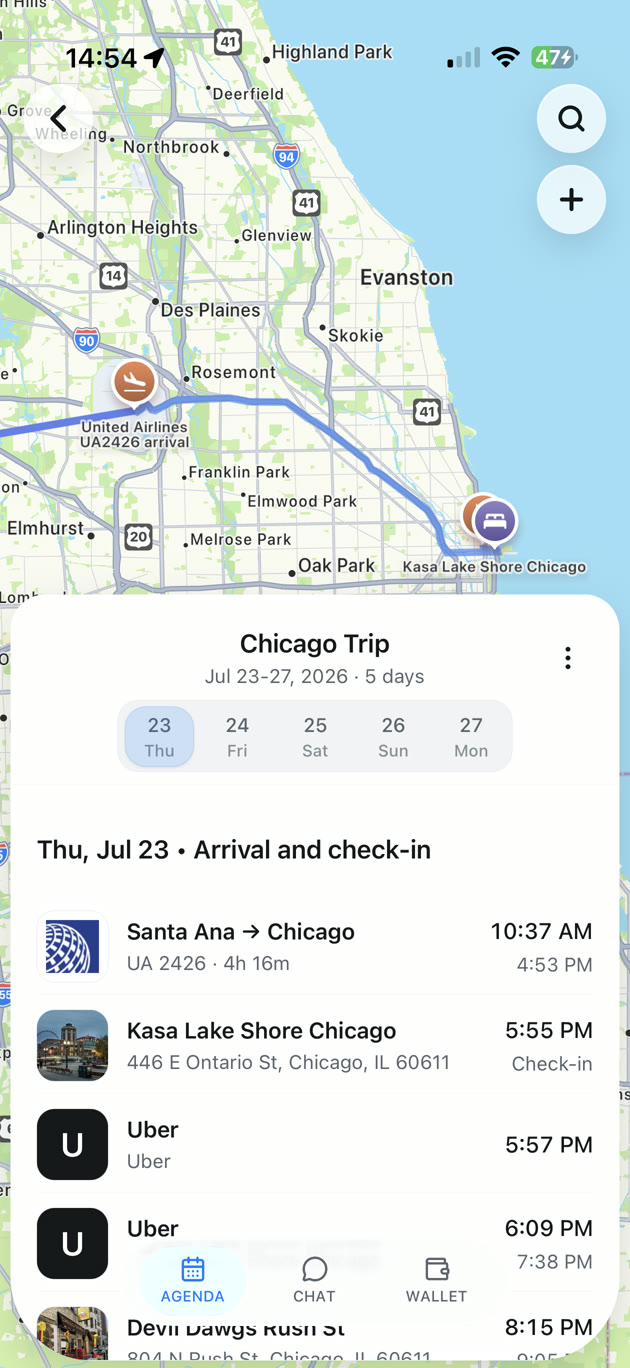
What a trip organizer app is actually for.
Not a wish-list of features — one job, done well: turn the scattered confirmations in your inbox into a single trip you can trust, and keep it that way when plans change.
A booking lands as an email. Then another, from a different airline. Then a hotel, a rideshare receipt, a dinner reservation, a museum ticket. By the time you travel, the trip is spread across a dozen threads in two mailboxes — and three of them are already out of date.
The job of a trip organizer app is to collapse all of that into one clean itinerary, automatically, and keep it current. The apps below all attempt it. They differ most on a single question: how much of the filing do they hand back to you?
If you want to see what the organized result looks like day to day, our travel itinerary planner page walks through a trip that builds and maintains itself.
- Pulls bookings in without manual entry
- Keeps one living timeline as plans change
- Free version that’s genuinely useful
TripNoted vs TripIt, Wanderlog, Tripsy & Google Calendar.
Each app has useful tools. TripNoted brings booking emails, saved places, shared editing, and free offline trip work together. Scan the rows that matter to you.
| What to compare | TripNoted | TripIt | Wanderlog | Tripsy | Google Calendar |
|---|---|---|---|---|---|
| Automatic email import on the free plan | Yes — included free | Yes — Inbox Sync is free | No — auto-scan is Pro only | No — auto-import is Pro only | No — nothing imported automatically |
| Forwarding emails required? | Never — it reads your inbox | No with free Inbox Sync | Yes on free — you forward each one | Yes — “automatic” still means forwarding | Yes — you create every event by hand |
| Living updates after a booking changes | Yes — changes merge in place | Yes, for tracked itineraries | Partial — manual edits mostly | Partial — flight tracking on Pro | No — you edit the event yourself |
| Travel history / memory of past trips | Yes — 6 mo free, up to 10 yr on Plus | Yes — keeps past trips | Saved trips you created | Saved trips you created | Only events you kept |
| Privacy (Gmail OAuth, no password stored) | Sign in with Google, OAuth only | OAuth mailbox connect on Free | OAuth scan on Pro | Forwarding, so no inbox access | Google account (no email scanning) |
| Platforms | iPhone and web | iOS, Android, web | iOS, Android, web | iOS, macOS | iOS, Android, web |
| Price to remove the limits | Plus $5/mo or $49/yr | Pro $49/yr | See Pro pricing | See Pro pricing | Free (but fully manual) |
TripIt, Wanderlog, Tripsy and Google Calendar are trademarks of their respective owners. TripNoted is not affiliated with them. Plan details were checked in September 2026 and may change — check each provider for current terms.
What to look for in a trip organizer app.
If you only remember one thing: the best apps do the organizing for you. These six criteria separate a real organizer from a prettier spreadsheet.
It works from your inbox automatically
The whole point of a travel organizer app is to stop doing the filing. The best ones read the booking confirmations already in your inbox — no forwarding to a special address, no copy-paste. If you still have to feed it every email, it is a nicer spreadsheet, not an organizer.
The free plan is genuinely useful
Free plans can be capable. Compare the initial import window, which inboxes work, offline use, and how easily you can plan with other people before you pay.
Itineraries stay current on their own
Plans change. A flight moves, a hotel confirms a new room, a tour shifts an hour. A living itinerary merges those updates into one clean timeline instead of stacking another email on the pile. Static itineraries go stale the moment something changes.
It covers the whole trip, not just flights
Great trips are flights and hotels and rides and dinners and tickets. A good trip itinerary app recognizes confirmations across the entire journey — restaurants on Resy or OpenTable, activities, car rentals, cruises and rail — so nothing falls through the cracks.
Privacy you can actually verify
If an app reads your inbox, it should sign in with Google directly (OAuth), never store your password, take only what it needs, and let you disconnect in a couple of taps. Inbox access is a big ask; the controls should be obvious.
It remembers where you've been
Past trips are useful context for the next one. An organizer that keeps your travel history can plan faster and answer questions grounded in what you actually booked — not a blank slate every time.
Why we built TripNoted to be the best trip organizer app for most people.
We’re biased — we made it. But the reason it tops the table is simple: the automatic part isn’t the upsell. It’s the free, default experience.
- Automatic from the very first sign-in — including your last six months — with no forwarding and nothing behind a paywall to get started.
- Updates merge into one living timeline instead of piling up as new, conflicting emails.
- Covers the whole journey: flights, hotels, rides, restaurants, activities, cruises, rail and car rentals, across multiple mailboxes.
- Ask your trip: a calm assistant grounded in your real bookings and travel history — not a from-scratch trip generator.
- Private by design: sign in with Google, no password stored, disconnect or delete anytime.
Free $0 · Plus $5/mo or $49/yr · Available on the App Store
When another app might suit you better.
No app wins for everyone. Here’s where the others have a real edge today.
Pick TripIt if
You want a mature native app on iOS or Android with free Inbox Sync. Pro adds real-time flight alerts, better seat suggestions, and alternate-flight tools.
Pick Wanderlog if
Your trips are heavy on day-by-day route planning, maps and collaborative lists, and you don’t mind forwarding confirmations yourself on the free plan.
Pick Tripsy or Calendar if
You’d rather an app never touch your inbox at all — Tripsy works by forwarding, and Google Calendar is free and fully manual if you only need a few events.
Best trip organizer app, answered.
The questions people ask before they pick one.
TripNoted and TripIt both include automatic inbox import for free. TripNoted also lets you save places from travel links, share trips with view or edit access, and do supported trip work offline on iPhone for free. TripIt supports more email providers and is a strong choice if you want a mature booking organizer. Wanderlog offers broad route and expense tools; Google Calendar is useful for simple events.
Yes. TripNoted connects to Gmail and organizes recognized booking emails automatically on Free. TripIt also offers free Inbox Sync for supported email providers. Wanderlog puts automatic Gmail import in Pro, while Tripsy uses forwarded reservations. Google Calendar requires manual events.
TripNoted and TripIt both organize booking updates. TripNoted also brings in saved places and lets invited people edit the same plan. TripIt Pro adds real-time flight alerts and alternate flight tools.
Yes. TripNoted is available as a native iPhone app on the App Store.
TripNoted connects with Google OAuth and does not store your Google password. TripIt also uses a password-free connection for Inbox Sync. You can disconnect Gmail from TripNoted when you choose.
Try the automatic one. Free, in minutes.
Connect Gmail and watch your booking emails become one living itinerary — no forwarding, no spreadsheets. Your last six months are free, and you can disconnect anytime.
No password stored · Disconnect anytime · Available on the App Store